Team, roles & permissions All plans
Inviting staff, roles per property, what each permission opens, how plans and permissions combine, and the full list generated from the app itself.
Updated 2026-10-15
Adding people
Admin›Users. Create New makes an account with a password you hand over; Add Existing attaches someone who already has a Travel 404 account (a traveler, a volunteer from another house). Each person gets a role at this property; the same person can be a manager in one house and a volunteer in another. Deactivating removes access without deleting history.
Roles
Admin›Roles. A role is a named set of permissions: Admin, Manager, Receptionist, Volunteer are the defaults; make your own. The role editor groups permissions the way the sidebar is organised, so "can this person open Finance?" is one switch. Changes apply live, nobody needs to sign out.
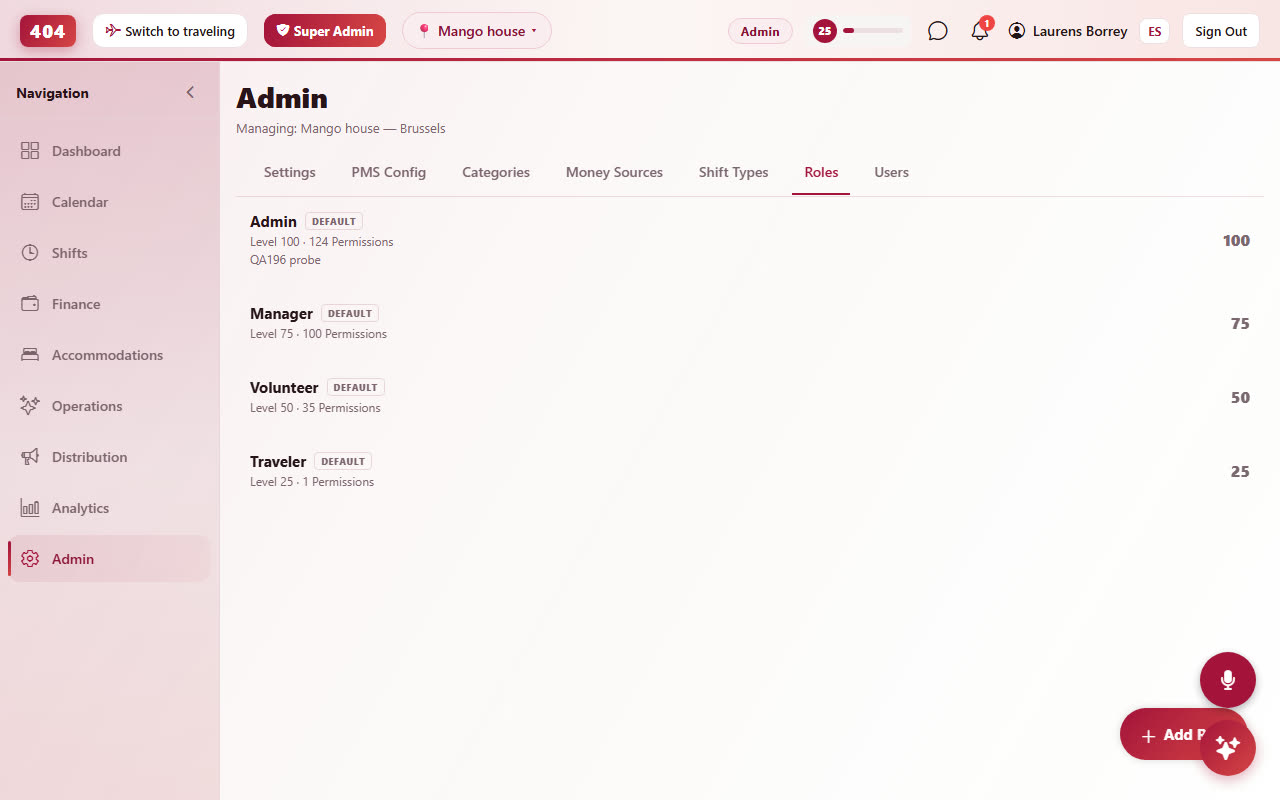
Permissions versus plans
Two layers decide what a person sees: the role (may they?) and the property's plan (does the property have it?). A permission the role grants but the plan withholds shows as a locked item that opens the plan chooser. Platform staff looking at your property see the same locks as badges. See Plans.
Every permission
Generated from the app's own list, so it is always current. Filter by word.
Navigation
nav.overviewnav.shiftsnav.financenav.adminnav.calendarnav.roomsnav.activitiesnav.marketingnav.reportsnav.marketing_performanceTest feature, Co404 Oaxaca only
nav.profilePersonal profile + account settings (universal — recommended for every role)
Navigation › Calendar Group
nav.bookingsnav.front_desknav.guestsNavigation › Finance Group
nav.collectionsnav.paymentsNavigation › Accommodations Group
nav.rate_plansNavigation › Operations Group
nav.housekeepingnav.tasksnav.messagesnav.posnav.communicationsNavigation › Distribution Group
nav.channelsnav.booking_engineNavigation › Analytics Group
nav.ai_insightsThe AI Insights tab — Claude-powered analytics, chat, and reports.
Assistant
agent.useAsk Travel404 to do things in plain language. Every action the assistant takes still requires the permission for that action.
Navigation › Profile Group
nav.xpNavigation › Shifts Group
nav.scheduleShifts
shifts.startshifts.endEnd your own active shift. Required even for admin/manager to end their own.
shifts.end_otherEnd an active shift that belongs to another user (admin/manager override).
shifts.viewView shifts from all staff
shifts.view_ownCan only see their own shift history
shifts.editEdit any staff member's shifts
shifts.edit_ownEdit only your own shifts
shifts.view_allSee full shift history across all staff
shifts.deletePermanently delete a shift record. Destructive — typically admin only.
shift_types.manageCreate, rename, archive, and configure shift types per location (Reception, Bar, Till #2…).
Admin
xp.backfill_achievementsRecompute achievement awards across the system. Heavy operation, admin only.
users.manageAdd, edit, deactivate users
users.change_rolePromote/demote users. Capped at the changer's own role level — nobody can elevate above themselves.
roles.manageCreate, edit, delete roles
admin.accessCan access the Admin page
Finance
transactions.createCreate transactions on your own active shift.
transactions.create_otherRequired to add a transaction to a shift you don't own (admin/manager override). Without this, users can only add to their own active shift.
transactions.viewtransactions.edittransactions.deletecategories.managemoney_sources.managemoney_sources.view_balanceView the dollar amount in each money source. Without this, the user can still pick a source for transfers/transactions but the balance shows as '—'.
finance.treasuryfinance.transfersfinance.adjustmentsfinance.reportsfinance.settingsPick who receives notifications when finance drift is detected (variance on shift close, orphan balance events, count-vs-system divergence).
finance.reconcile_viewSee the list of open drift events in Finance > Treasury > Reconciliation, plus the sidebar red dot.
finance.reconcile_resolveMark inbox cards as resolved, dismissed, or applied as a balance adjustment.
finance.delete_permanentlyHard-delete a soft-deleted (crossed-out) transaction, transfer or adjustment. Without this, delete is a recoverable soft-delete only.
payment.viewpayment.connectpayment.disconnectAdmin only
Reports
reports.viewreports.exportDownload CSV/PDF reports
Schedule
schedule.manageCreate and assign shifts
schedule.viewteam.viewRoster of volunteers/staff with stay details and the staffing-capacity timeline
team.manageEdit a volunteer's stay details (room label, channel, arrival, skills) and the staffing target
handbook.viewRead the property handbook (protocols, checklists, emergency contacts)
handbook.manageEdit the property handbook
Guests
guests.manageCreate, edit, delete guests
guests.viewAnalytics
analytics.viewProperty
property.viewAccess reservation system
property.manageConfigure rooms, rates, property settings
property.reservationsCheck in, check out, cancel, modify
property.housekeepingUpdate room cleaning status
property.invoicesCreate, issue, void invoices
property.api_keysCreate and revoke partner API keys for external integrations
property.reservations_deletePermanently remove a cancelled reservation and its history (test bookings)
property.edit_bookingsChange booking details: edit reservations, change dates, override prices, and move guests between rooms/beds. Without it, bookings are view-only.
Property Payments
property.refundproperty.checkout_unpaidproperty.override_balanceproperty.cancel_waive_feeproperty.guest_creditsproperty.damage_depositsproperty.room_changeChannels
channels.viewchannels.connectchannels.syncchannels.mappingschannels.credentialschannels.restrictionschannels.pushMarketing
marketing.viewmarketing.manageActivities
activities.manageCreate, edit, cancel activities
activities.deletePermanently delete cancelled activities
activities.viewactivities.balance_manageSee what staff owe for activities and record their payments
activities.view_staff_costSee the staff-only price on an activity — hidden from travelers
Housekeeping
housekeeping.manageCreate and assign cleaning tasks
housekeeping.viewMap
map.viewmap.eventsmap.adminApprove verifications, moderate
Messaging
messaging.readView 1:1 conversations and message history.
messaging.sendSend messages to other travelers.
Communications
communications.viewSee the property's email/WhatsApp/SMS templates and the send log per booking.
communications.manageCreate, edit, delete templates; send ad-hoc messages to guests from a booking.
communications.whatsapp_lineConnect or disconnect the property's own WhatsApp number by QR code. Automatic messages are sent from that number.