Communications & guest emails All plans
Every email the app sends on your behalf: which ones exist, what you can edit, merge tags, the Spanish version, and the WhatsApp line per property.
Updated 2026-10-15
What goes out, and when
| When | Plan | |
|---|---|---|
| Booking confirmation | Right after a booking is confirmed (or held, with the payment link) | Essentials |
| Pre-arrival with check-in link | Days before check-in, with {{registration_link}} | Essentials |
| Payment reminders | Open balance before arrival | Essentials |
| Arrival survey | After check-in | Essentials |
| Review request | After check-out | Essentials |
| Any trigger, custom templates, your own sender domain | You decide | Pro |
Every email sent is listed on the booking's Comms tab with its status, so "did she get the confirmation?" is one click.
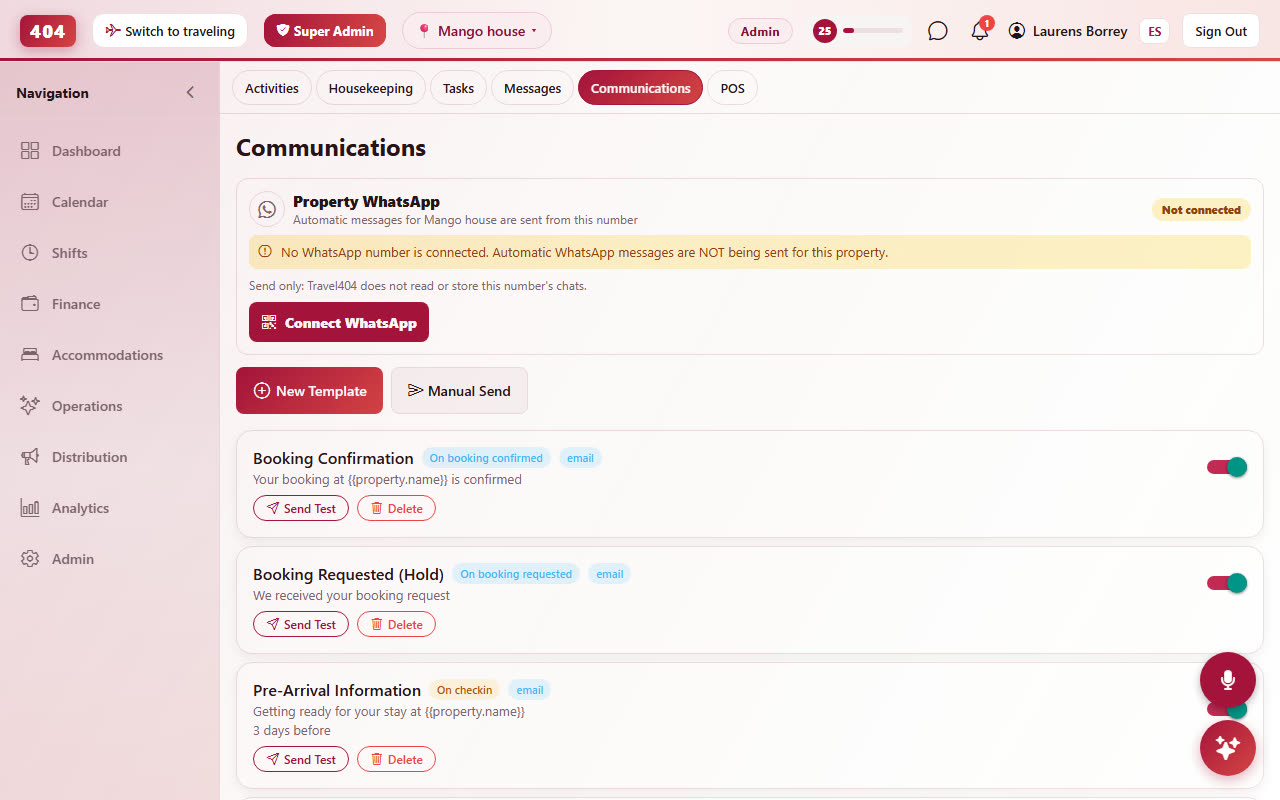
Editing a template Pro & Complete
Operations›Communications › pick a template. Subject and body with headings, bold, links, lists and images; the room types it applies to; whether it is active. Merge tags fill in per guest: {{guest.first_name}}, {{property.name}}, {{reservation.booking_ref}}, {{reservation.check_in}}, {{reservation.balance_due}}, {{reservation.balance_breakdown}}, {{registration_link}}, {{portal_link}}; the editor’s Insert button lists every tag. Dates are written out in the guest's language.
{{reservation.balance_breakdown}} prints the whole money picture in one block: the stay, what is paid, what is still to pay for the stay, every activity or extra added after booking and what is still to pay for those. Payments count towards the stay first, so a deposit never looks like it paid for the brunch. The parts exist as tags of their own ({{reservation.stay_total}}, {{reservation.extras_total}}, {{reservation.extras_lines}}, {{reservation.stay_balance}}, {{reservation.extras_balance}}), and the block is written in the language of the body it sits in.
Link tracking (UTM) can be switched on per template so visits from your emails show up in your analytics.
Manual Send (the button at the top of Communications) writes one email now. Pick the guest from your own list with the search box: the address fills in and merge tags render from that guest's latest booking. If you type an address by hand instead, the message must not contain merge tags, because there is no booking to fill them from.
The Spanish version Pro & Complete
Every template has an optional Spanish version (subject and body). A guest marked Spanish receives the Spanish subject if you wrote one and the Spanish body if you wrote one; anything left empty falls back to the English version above it. Fill both or neither.
How a guest becomes "Spanish": the language they used on the booking page or the online check-in form, nothing is asked. Staff can change it on the guest card. See Booking engine › language.
The confirmation email
The confirmation is the one email every guest gets. Its layout is fixed (reference, dates, room, the stay and every activity or extra on the booking, total, what is paid, balance, your address and contact) and three parts are yours: the cover photo on top, your confirmation message above the details and an extend-your-stay offer under them, both from Booking Engine›Booking Settings›Booking confirmation.
WhatsApp line per property Pro & Complete
Each property can connect its own WhatsApp number (Operations›Messages). Guest replies and the app's WhatsApp messages run through that number only; there is no shared fallback line. Scanning the QR again reconnects it after a phone change.
Sender, deliverability and limits Pro & Complete
Emails are sent from Travel404's domain with your property name as the sender name and your contact email as reply-to; on Pro you can send from your own domain (custom SMTP). Bounces and spam complaints are logged per guest. Marketing emails go only to guests with consent.